
Article summary generated by AI — it may contain errors.
Table of contents
Every modern machine needs a clear way to communicate with its operator. This communication enables users to check device status, monitor process progress, adjust settings, and respond to events as they occur. In industrial systems, this role is performed by an HMI (Human–Machine Interface). HMI is a key element of modern automation and an important part of systems aligned with the Industry 4.0 concept.
HMI-based solutions can take various forms – from a traditional operator panel installed as a standalone component on a control cabinet door, operator console, or machine panel, to an integrated module built directly into the device. They can be designed in various ways, but in many modern industrial applications, touch-enabled display solutions are preferred. They combine data visualization with intuitive operation, reducing the need for additional buttons, switches, or external control components.
HMI – what is it?
An HMI is an interface that enables a person to communicate with a machine, device, or control system. It acts as a layer that turns technical data from the machine into information the operator can understand, and user actions into commands executed by the system. An HMI allows the operator to see what is happening with the machine and respond accordingly. It can display the current device status, temperature, operating speed, fill level, alarm messages, production data, or event history. From the HMI panel, the operator can also start a process, change operating parameters, select an operating mode, acknowledge an alarm, or access diagnostics.
Historically, operator panels could take the form of extensive control desks with buttons, switches, indicators, and signal lamps. Today, the standard is display-based solutions – often with touch functionality – which can be supplemented with mechanical elements such as function buttons, knobs, or signal indicators.
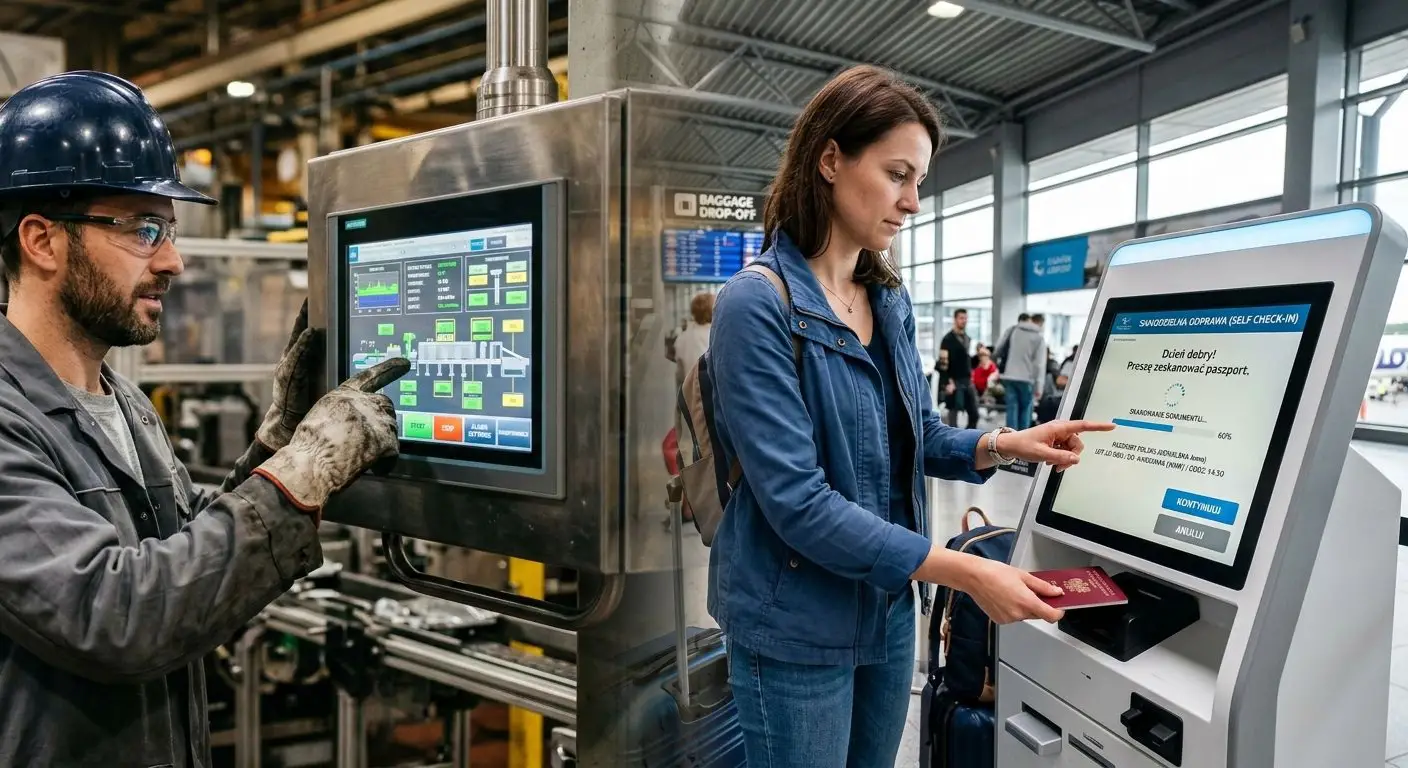
Although the term HMI can refer to various devices that enable interaction with a machine, in practice, it is most commonly used in industrial automation, robotics, medical technology, transport, energy, retail, and technical infrastructure. This includes, among others, operator panels, control system interfaces, self-service terminals, passenger and public information systems, parking devices, POS solutions, as well as panels used in building automation, access control systems and energy installations.
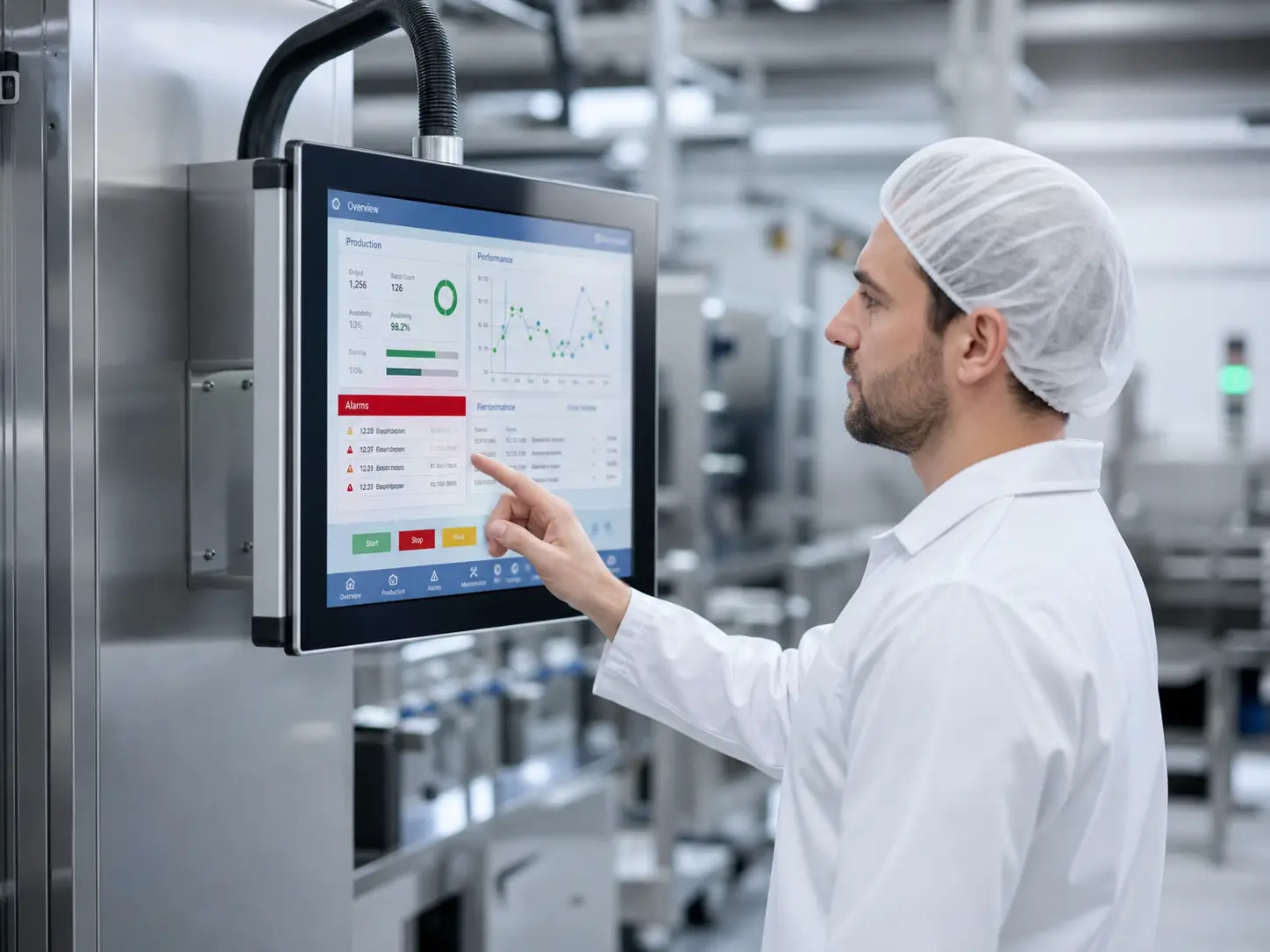
Let us imagine a workstation with an industrial robot performing repetitive operations on a production line. An HMI panel located in close proximity to the robot allows the operator to monitor its status, check operating parameters, start tasks, respond to alarms, and access diagnostics. In more advanced systems, selected data may also be available from a computer, tablet, or web-based interface, but the local operator panel remains the primary point of operation. This gives the operator quick access to the most important information and enables safe device control.
How does an HMI system work?
An HMI system combines hardware components – such as a display, touch panel, controller, and communication interfaces – with software that handles data visualization, command processing, and information exchange with the control system.
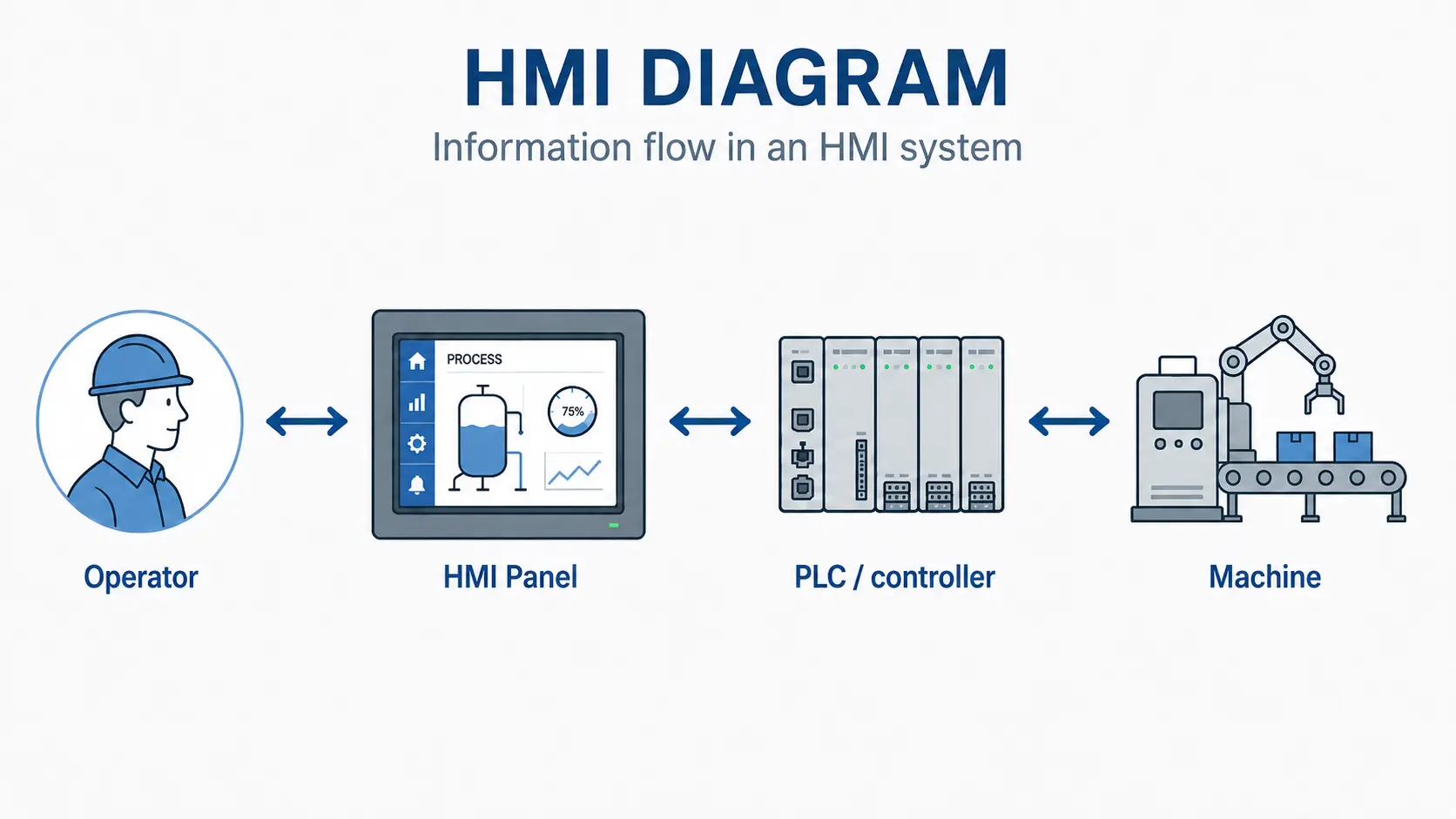
In practice, the operation of an HMI can be described in several steps. The machine, sensors, or PLC provide information about the current state of the process. The HMI panel receives this data and presents it to the operator in a clear format – as parameters, messages, charts, or alarms. The operator can then take action – for example, change settings, start a procedure, acknowledge an alarm, or stop the process. The user-entered command is sent back to the control system, which performs the appropriate operation.
Hardware layer – display, touch panel, and controller
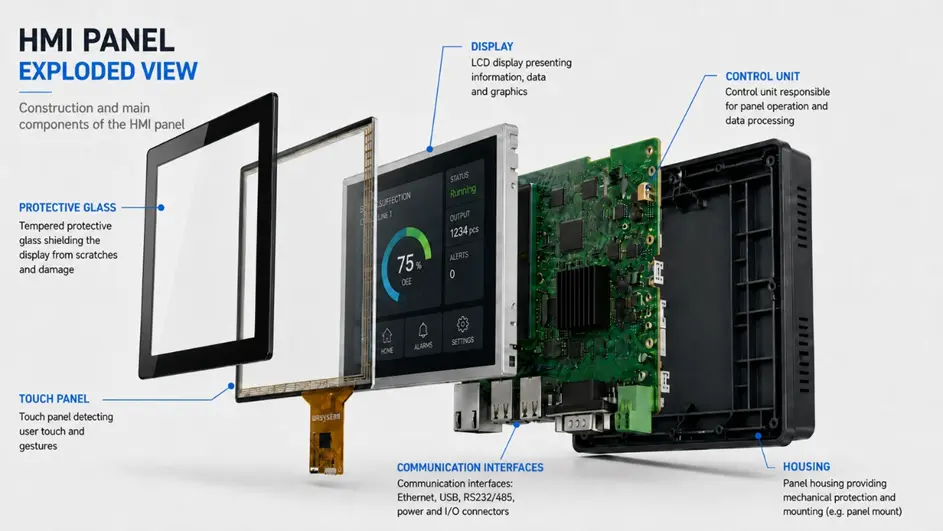
A typical HMI panel combines several hardware and software components: a display, a touch panel, a control unit, communication interfaces, and software responsible for data presentation and operator command handling. The selection of these elements determines whether the panel is readable, convenient to use, and properly adapted to the device’s operating conditions.
The table below presents the key components:
| Component | Technology | Why it matters |
| Display | Most commonly TFT-LCD, selected based on parameters such as diagonal size, resolution, brightness and viewing angles | Used to visualize information about the device or process operation – including operating data, statuses, alarms and system messages |
| Touch panel | Resistive (RTP) or capacitive (CTP) touch panel enabling touch-based control | Allows the operator to interact directly with the interface and enter commands from the panel |
| Control unit | Platform based on a microcontroller, SoC or industrial computer | Runs the HMI software, communicates with the PLC and processes data |
| Communication interfaces | RS-232, RS-485, CAN, USB, Ethernet and industrial communication protocols, such as Modbus, CANopen, OPC UA and MQTT | Enable data exchange between the HMI panel and other system components, such as PLCs, sensors, I/O modules, SCADA systems or higher-level systems |
The scope of HMI panel components depends on the specific application’s requirements. In simpler solutions, the display, touch panel, control unit, and communication with the system are the key elements. In more demanding projects, additional components for mechanical integration, power supply, and device protection are also required – including protective glass, suitable seals, optical coatings, I/O modules, memory for historical data, and additional buttons or signal indicators.
Power supply is also an important element, as it must ensure stable operation of the electronics under the conditions typical of a given application. Depending on the project, it may include a power supply unit, DC/DC converters, filters, surge protection, or other components that protect the circuit against voltage fluctuations and interference. This is particularly important in industrial environments, where an HMI panel may operate in close proximity to motors, frequency inverters, switched-mode power supplies, or other sources of electromagnetic interference.
The housing, or the way the panel is integrated into the device enclosure, is equally important. If the HMI panel is a separate module, the housing protects its components against dust, moisture, water, impacts, and other environmental factors. If, however, the HMI is built directly into the device, a similar protective role is performed by the structural elements of the entire system – the front, frame, protective glass, seals, and materials selected for the operating conditions. In such cases, factors such as the IP protection rating, IK mechanical impact resistance rating, and the durability of the materials under intensive use become important.
Software layer – visualization and control logic
The second part of an HMI system is the software. It determines what information the operator sees, how it is presented, and which actions can be performed from the panel.
Well-designed HMI software supports the operator in day-to-day machine operation by enabling, among other things:
- display of process data – such as temperature, pressure, speed, fill level, number of produced items or the current machine status,
- presentation of alarms and messages – providing information about errors, threshold exceedances, failures, process stops, or the need to perform maintenance activities,
- control and adjustment functions – changing operating parameters, starting procedures, acknowledging alarms, switching operating modes, or stopping the process,
- communication with the PLC and other devices – receiving data from the control system and sending commands entered by the operator,
- user access management – limiting the ability to change critical parameters to authorized users only, such as an operator, service technician, or administrator,
- data archiving – storing alarm history, trends, process recipes, events, or selected operating parameters,
- support for diagnostics – making it easier to identify problems, analyze errors, and respond more quickly to irregularities.
A properly designed HMI software layer should be clear, logical and aligned with the operator’s actual tasks. It is not only about making the interface visually appealing, but above all about providing quick access to the right information and enabling safe process operation.
Functions of an HMI panel
An HMI panel can perform many functions that support day-to-day machine operation, control, and optimization.
Data visualization and monitoring
An HMI enables the operation of a device or process to be monitored by presenting key information in the form of parameters, indicators, charts, counters, statuses, and messages. This allows the operator to quickly assess the current state of the installation, detect deviations from normal operation, and respond to process changes without inspecting individual machine components.
Control and adjustment
An HMI panel can send commands to devices via a PLC, enabling operators to, among other things, change speed, enter settings, select an operating mode, start specific sequences, or manage recipes tailored to a particular production process. Depending on the system configuration, the HMI may also support controlled process shutdown or transition of the machine to a defined operating state.
It should be remembered, however, that an HMI panel does not replace dedicated machine safety systems. Functions such as emergency stop, guard interlocks, or operator protection should be implemented through a separate safety architecture that complies with the requirements of the given application.
Alarming and diagnostics
The system informs the operator of threshold exceedances, errors, or emergency states, while the event history enables analysis of causes and planning preventive actions. An HMI panel can present alarms as text messages, visual signals, or event lists, helping the operator quickly identify the problem and take the appropriate service or operational action.
Data archiving and reporting
Storing historical data, recipes, or process trends enables analysis of efficiency and optimization of production. The collected information can be used to compare operating parameters across different periods, document the process, support quality control, and prepare reports for technical and organizational decision-making.
Communication gateway
An HMI can act as an intelligent gateway, connecting devices in a local network with higher-level systems or the cloud. By supporting various communication protocols, the panel can mediate data exchange between PLCs, sensors, drives, SCADA, MES, or ERP systems, supporting the integration of automation with the broader IT environment.
Most commonly used HMI variants
HMI can take many forms, but in this article, we focus primarily on display-based solutions, as this is the area we know best – and one that is increasingly used in this type of application. It is worth remembering, however, that an HMI does not have to be limited to a screen-based interface. In many devices, the display still works alongside physical elements such as buttons, knobs, switches, or signal LEDs. Only when these elements are properly combined do they create a convenient and safe way to operate the device.
Simple information displays
Simple information displays are used mainly to present basic data, statuses, messages, or alarms. They do not need to include touch functionality – operation can be handled using buttons, switches, or function keypads. These solutions work well in devices where the operator primarily needs quick access to information, and the scope of interaction is limited. They can be used, among others, in measuring devices, access control systems, simple controllers, signal panels, and technical installations.
Operator panels
Operator panels enable local operation of a machine, device, or process. They usually combine a display with control elements – such as physical buttons, knobs, a function keypad, or a touch panel.
Their role is to provide the operator with constant access to the most important information: operating parameters, statuses, alarms, settings, and basic control functions. This type of HMI is used, among others, with production machines, technological lines, building automation systems, and infrastructure installations.
Industrial tablets
Industrial tablets combine a display, touch panel, and computing unit in a single enclosure. They are used when data display and basic operation alone are insufficient, and the user needs a standalone device with local data processing, more advanced software, or the ability to communicate with multiple system components.
One of their important features is mobility – the device can be carried and used across different areas of a facility, for example, during diagnostics, quality control, service inspections, warehouse operations, or the supervision of distributed workstations. These solutions are suitable for monitoring systems, production and logistics applications, and mobile data terminals, among others. Depending on the design, they can function as a portable operator station, a service device, or a complementary element of a larger automation system.
Embedded HMI – an HMI integrated into the device
An embedded HMI is an interface designed as an integral part of a specific machine, device, or piece of equipment. In this type of solution, the screen, touch panel, protective glass, frame, sealing, electronics, and mounting elements are adapted to the mechanical design, operating conditions, and expected method of use.
This type of HMI combines data display with direct control from the screen, reducing the need for multiple additional buttons, switches, or indicators. It enables the creation of clear operator views, menus, process visualizations, service messages, alarms, and diagnostic screens.
Depending on the application, an embedded HMI may use capacitive or resistive touch technology. The choice of solution depends, among other things, on the operating environment, required durability, sealing, mechanical resistance, and ease of use. This approach is particularly suitable when the device’s front appearance, operating ergonomics, and the precise integration of the interface into the enclosure are important.
Mobile and web-based tools supporting HMI
In more complex systems, a local HMI panel can be supported by additional tools, such as tablets, smartphones, laptops, or web-based interfaces. They enable data preview, remote monitoring, diagnostics, or service support – especially in distributed applications or when information needs to be accessed from different workstations.
However, such solutions usually serve a complementary role. In an industrial environment, the primary point of operation remains the HMI panel, which is designed to work with the machine or is integrated directly into the device. This is due to requirements related to continuous operation, resistance to environmental conditions, operational stability, safety, and integration with the control system.
Web-based interfaces and mobile devices can therefore improve access to data, but they do not always replace an industrial operator panel. Most often, they extend their functionality by enabling faster status previews, alarm analysis, or service support away from the machine’s immediate vicinity.
HMI and other systems
An HMI rarely operates as a completely separate element. In automation systems, it most often works alongside PLCs, SCADA systems, sensors, I/O modules, and software for data collection and analysis. It is therefore useful to explain how HMI differs from other terms that frequently appear in the context of automation and user interfaces.
HMI vs. PLC
HMI and PLC perform different functions in an automation system, although they very often work together.
A PLC, or Programmable Logic Controller, is a controller responsible for executing process logic. It receives signals from sensors and other input devices, processes them according to programmed rules, and then controls actuators such as motors, valves, pumps, cylinders, or relays.
In practice, the HMI is the operator layer, while the PLC is the control layer. The operator can press a “Start” button on the HMI screen, change a parameter, or read an alarm, while the PLC performs the corresponding actions in the machine or process. The difference, therefore, lies mainly in their roles: HMI is used for operation and visualization, while PLC is used for control and automation.
HMI vs. SCADA
HMI and SCADA are related, but they are not the same thing. An HMI is primarily used for local operation, monitoring, and control of a machine or process.
SCADA, or Supervisory Control and Data Acquisition, operates at a broader level. It enables supervision of multiple devices, lines, installations, or facilities. It collects data from various sources, archives it, analyzes it, and makes it available within a higher-level process management system.
In practice, an HMI can be part of a SCADA system or operate as a local operator interface at the machine. The difference lies mainly in the scale of operation and the scope of functions – HMI focuses on direct interaction between the operator and the process, while SCADA provides broader supervision, data acquisition, and system-level analysis.
HMI vs. GUI
It is also worth distinguishing HMI from GUI (Graphical User Interface). A GUI is the graphical layer of the interface – what the user sees on the screen and interacts with directly. It includes, among other things, buttons, charts, indicators, animations, icons, menus, messages, and the layout of individual views. It is therefore responsible for how information is presented and how the user navigates through the interface.
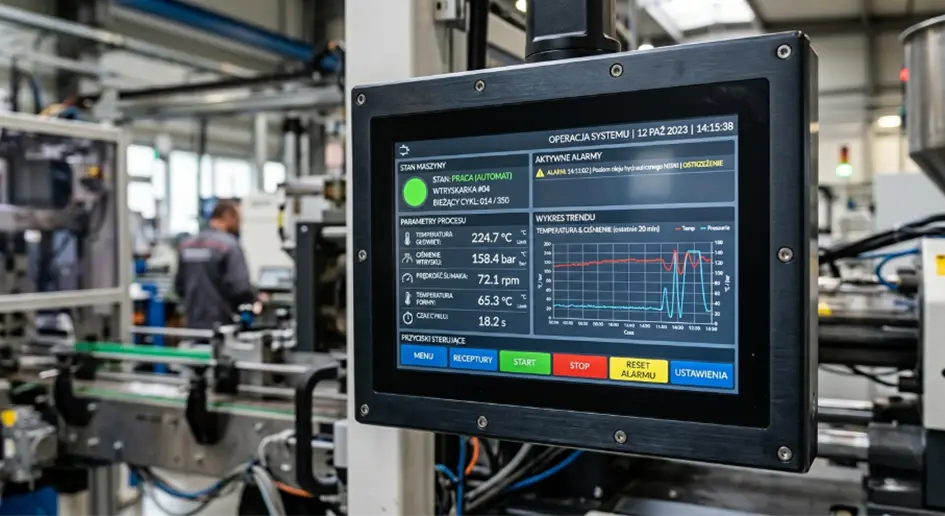
HMI is therefore a broader concept, while GUI is one of its components. For example, the view shown on an HMI screen, including a “Start” button, a temperature chart, and an alarm list, is part of the GUI.
The table below shows the role of each element in the automation system architecture:
| System | Main role | How it works in practice |
| HMI | Operator layer – operation and visualization | Enables the operator to view data, alarms and statuses, and to issue commands from a panel, touchscreen or buttons |
| PLC | Control layer – process logic and automation | Receives signals from sensors, processes them according to the program and controls actuators such as motors, valves or pumps |
| SCADA | Supervisory layer for monitoring and data acquisition | Collects, archives and analyzes data from multiple devices, lines or facilities, providing a broader view of the entire system |
| GUI | Graphical layer of the interface | Defines how information is presented on the screen – for example, buttons, charts, icons, menus, messages and view layouts |
HMI and UX – why does interface design matter?
In HMI systems, interface ergonomics directly impacts operator response time, process safety, and the convenience of day-to-day operation. A properly designed interface should not overload the user with too much information. Key data must be immediately visible, while alarms, statuses, and control elements should be arranged in a logical, consistent manner.
UX design in HMI requires consideration of the conditions in which the operator actually uses the panel.
Important principles of HMI interface design include:
- clear interface layout – the most important information should be easy to notice, without the need to navigate through multiple menu levels,
- consistent navigation – the user should quickly understand where they are and how to return to the previous screen,
- clear alarms and statuses – messages should be unambiguous, clearly visible, and linked to the expected operator response,
- reduced risk of errors – critical operations should require confirmation, while access to sensitive settings should be restricted by user permissions,
- appropriate size of touch elements – buttons and interactive fields must be convenient to use, including with gloves if required by the working environment,
- fast system response – delays in data updates or touch response can make operation more difficult and lead to errors,
- logical grouping of information – parameters, alarms, trends, recipes, and settings should be organized in line with the operator’s actual workflow.
Where is HMI used?
HMI systems are used wherever a person needs to monitor, control, or configure a machine’s operation.
Examples of HMI applications include:
- production lines – monitoring machine operation, production counters, process parameters, and alarms,
- packaging machines – configuring packaging formats, line speed, counters, operating modes, and batch parameters,
- processing machines – handling recipes, temperatures, process times, dosing, mixing, and other technological parameters,
- industrial automation – supervising robots, conveyors, sorting systems, automated workstations, and production line operating parameters,
- energy and infrastructure systems – monitoring pump stations, HVAC installations, power supply systems, water networks, and wastewater treatment plants,
- medical and laboratory devices – handling operating parameters, device statuses, procedures, alarms, and user messages,
- transport – presenting passenger information, system statuses, and service messages, as well as operating on-board and stationary devices,
- special-purpose vehicles – presenting operational data, controlling selected functions, diagnostics, monitoring operating parameters, and handling operating modes.
In each of these cases, the HMI performs a similar function: it turns technical data and system signals into information the operator can understand and converts user actions into commands executed by the machine.
HMI is an important element of automation systems – it enables the operator to communicate with the machine and makes it easier to control even complex technological processes. Selecting the right HMI panel should take into account not only display parameters and touch technology, but also communication interfaces, operating conditions, ergonomics, and the possibility of integration with the entire system. A properly designed HMI improves process readability, reduces operator response time, and supports safe, efficient device operation.
Working on an HMI project? Contact us – together, we will select the right display and other components to ensure readability, reliability, and ease of use in the target operating conditions.