Article summary generated by AI — it may contain errors.
Table of contents
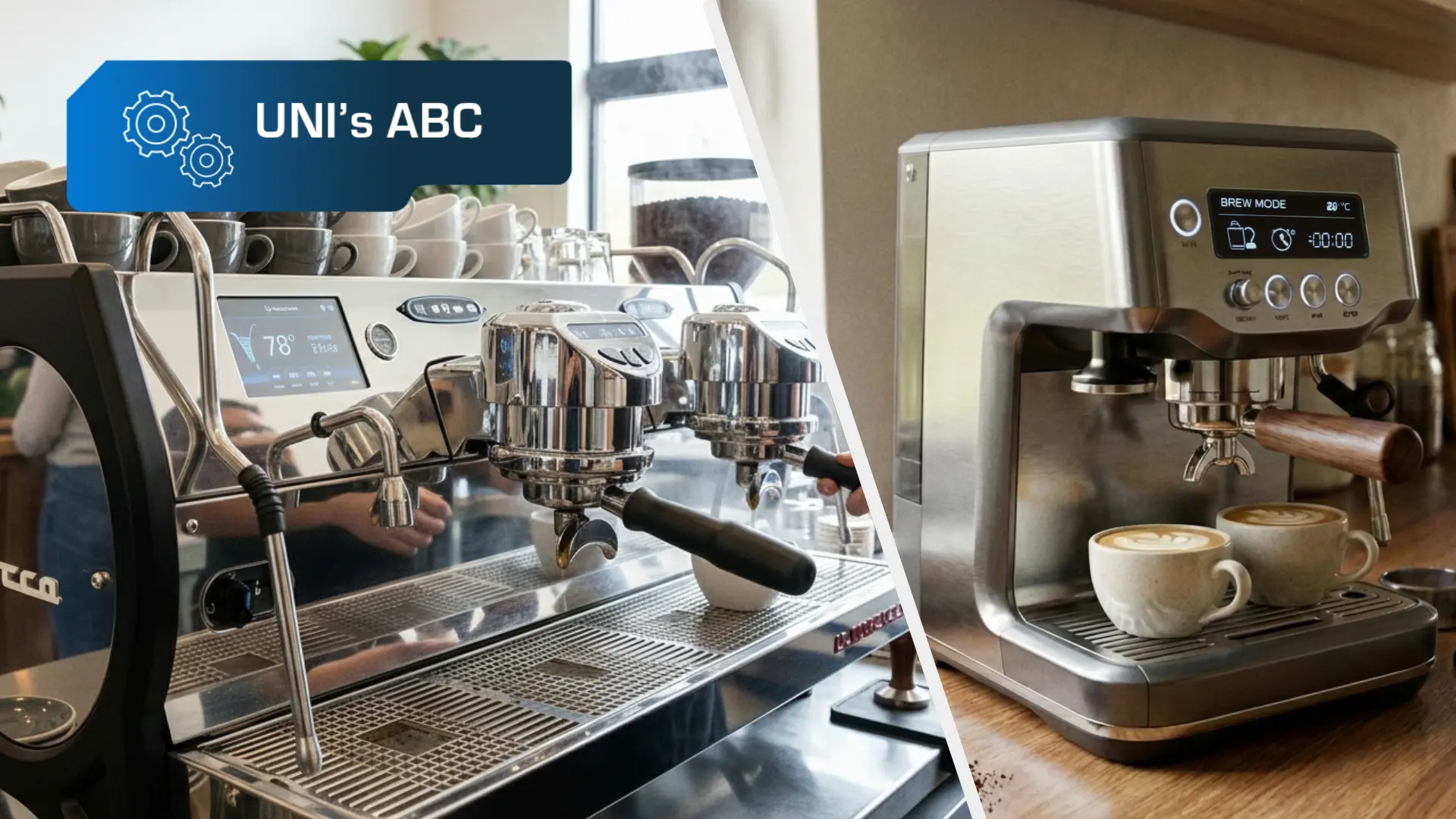
Displays have become an integral part of many devices that surround us today. Coffee machines are no exception. Both home appliances and office, café, and restaurant machines increasingly rely on visual interfaces that structure operations and improve user comfort. In this article, we explain how to select the optimal display solution for the coffee machine you are designing.
Depending on the application, a coffee machine display may be expected to handle anything from simple status messages to advanced menus, beverage programs, or service information. One thing remains constant – a well-designed HMI interface significantly improves usability and overall user experience.
Types of Coffee Machines
There are many different types of coffee machines available on the market, which can be classified, among other criteria, by the technology used to prepare the beverage. The differences between individual types primarily result from automation levels, extraction methods, and the degree of control over brewing parameters.
Automatic Coffee Machines
Automatic coffee machines represent the most technologically integrated solutions. The entire brewing process is carried out sequentially and controlled electronically – from grinding the coffee beans, through dosing and tamping, to extraction and cleaning of the brewing unit.
Key components include a grinder (steel or ceramic), a brewing unit, a pump generating stable pressure, a heating system (boiler or thermoblock), and a set of sensors monitoring water temperature, flow rate, and pressure. A central controller synchronizes the operation of all subsystems, ensuring consistent parameters and full control over the entire beverage preparation cycle. It is in this category of coffee machines that electronics play the most significant role.
Manual (Portafilter) Coffee Machines
Manual coffee machines are based on brewing coffee under high and stable pressure, with a greater degree of user involvement in the preparation process. Coffee is ground separately, manually dosed, and tamped in the portafilter, while the extraction itself is carried out by the machine’s hydraulic system. Pressure stability during brewing has a direct impact on beverage consistency – both in terms of flavor and extraction time.
From a technical perspective, the key components are the pump (most commonly vibratory or rotary), responsible for generating pressure, as well as regulating and safety valves (e.g., OPV) that stabilize system operation. In more advanced designs, pressure profiling and pre-infusion are also implemented. Pre-infusion involves wetting the coffee puck with lower pressure before full extraction begins, allowing for better process control and reducing the risk of channeling, especially when small changes in dose or grind size occur.
Thermal systems are equally important and include heating solutions such as single- or multi-circuit boilers and heat exchangers, along with precise temperature control –increasingly achieved using PID controllers. In this category, electronics primarily play a supervisory role, monitoring temperature, pressure, extraction time, and overall parameter stability. These machines are available in both semi-professional and fully commercial versions.

Capsule Coffee Machines
Capsule coffee machines use a closed brewing system in which the coffee is contained in a single-use capsule with predefined parameters. Once the capsule is inserted into the machine, a mechanism pierces or opens its casing, and a pump then forces hot water through it at a specified pressure.
This technology eliminates the need for a grinder and an adjustable brewing unit, significantly simplifying the overall machine design. Brewing parameters are predefined and cannot be modified by the user, ensuring a high level of process repeatability. The control electronics are therefore largely limited to managing temperature, water volume, and extraction time.
Drip Coffee Machines
Drip coffee machines are based on gravitational or low-pressure brewing technology. Water is heated to near-boiling temperature and then allowed to flow through ground coffee placed in a filter. Unlike pressure-based machines, the extraction process is not driven by high pressure.
The technical setup is relatively simple and consists mainly of a heating element, a water distribution system, and filtering components. Control functions – if present – typically focus on managing brewing time and temperature. This type of coffee machine is also available in fully commercial versions designed for preparing large volumes of coffee in a single cycle.
Coffee Vending Machines
Coffee vending machines are the most technologically advanced category of coffee machines. Their design combines a conventional brewing module (often similar to that used in automatic coffee machines) with additional systems responsible for fully autonomous user operation, payment handling, and access control.
From a brewing technology perspective, these machines use integrated grinding and brewing units, ingredient dosing systems (coffee, powdered or fresh milk, chocolate), high-pressure pumps, and advanced heating systems designed for continuous, intensive operation. The beverage preparation process is fully electronically controlled and executed according to predefined sequences.
A key characteristic of coffee vending machines is their advanced control and communication layer. The central control unit manages not only the brewing process, but also payment systems, user identification, inventory monitoring, and device diagnostics. As a result, vending machines are designed as modular systems in which mechanical, electronic, and visual components must work closely together to ensure reliability, process repeatability, and full operational autonomy.
The Display as a Communication Interface Between the Machine and the User (HMI)
We do not aim to advise which type of coffee machine is the best – this is the domain of other specialists. Our perspective focuses on the HMI layer, i.e. the system responsible for communication between the machine and the user. In practice, its central element is increasingly the display, which serves as an information carrier, a control interface, and a reference point for the user throughout the entire operating cycle of the device.
It is the screen that presents menus, brewing parameters, status, and service messages, and guides the user through successive stages of operating the coffee machine. A properly selected display technology, along with its parameters and interaction method, has a direct impact on readability, ergonomics, and the overall perception of the device – both in functional and aesthetic terms.
For the purposes of the following sections, we introduce a classification of coffee machines that sets the structure of the narrative and allows for a precise discussion of technological solutions:
- consumer coffee machines – designed for home use,
- industrial coffee machines – also referred to as professional or commercial coffee machines – developed for gastronomic applications (e.g. cafés and restaurants),
- coffee vending machines – self-service machines operating in public spaces.
Each of these groups requires a different approach to interface design. They differ in terms of operational complexity as well as user expectations. In addition, environmental factors play an important role – including, among others, resistance to intensive use.
Interfaces in Coffee Machines
Regardless of the type of coffee machine, every modern model relies on control electronics. The differences between individual devices, therefore, do not concern whether electronics are present, but rather how the user interacts with the machine. For this reason, in the following sections, the distinction between mechanical, electronic, and hybrid solutions refers exclusively to the user interface (HMI).
Electronic Interfaces
Electronic interfaces rely on the display as the sole means of communication with the user. This category primarily includes solutions based on LCD-TFT displays.
In this case, the screen functions as the central control element – it presents menus, brewing parameters, as well as status and service messages, while device operation is handled exclusively via an integrated touch panel, without the support of additional mechanical controls.
Advantages of electronic interfaces:
- high design flexibility – allowing free shaping of menu layouts, iconography, and messages,
- very good readability, enabling the presentation of multiple types of data at the same time (brewing parameters, operating status, other messages),
- intuitive operation based on well-established UX patterns, especially in touch-based solutions,
- easy functional scalability – the ability to expand interface features without interfering with the mechanical layer of the device,
- a modern, visually consistent appearance that enhances the overall aesthetics of the coffee machine,
- ease of cleaning and maintenance – the smooth, uniform screen surface allows for quick and effective cleaning and disinfection, without gaps or hard-to-reach areas.
Disadvantages of electronic interfaces:
- increased susceptibility to mechanical damage if the display is not properly protected with a cover glass,
- the need for precise adjustment of display parameters (brightness, contrast, viewing angles) to environmental conditions,
- the risk of accidental activations in solutions based solely on a touch panel if it is not properly calibrated.
Mechanical Interfaces
Mechanical interfaces are based on physical control elements such as buttons, membrane keypads, or rotary knobs. In this case, communication with the user is limited to simple signals, often supported by indicators such as LEDs.
Although solutions of this type are becoming less common today, they are still used in simple designs or in applications where maximum resistance to external factors is a key requirement.
Advantages of mechanical interfaces:
- high resistance of control elements to mechanical damage,
- suitability for intensive use,
- clear and predictable operation that does not require familiarity with a graphical interface,
- low failure rates of control components and straightforward diagnostics in the event of faults.
Disadvantages of mechanical interfaces:
- a limited amount of information that can be communicated to the user,
- lack of functional flexibility – any modification or expansion requires changes to the hardware layer,
- reduced clarity as functions become more complex, often necessitating the use of a large number of buttons,
- potential challenges in maintaining cleanliness due to gaps where dirt and contaminants may accumulate.
Hybrid Interfaces (Electronic–Mechanical)
Hybrid solutions combine the advantages of both approaches. The display is responsible for presenting information, while device operation is handled via physical control elements – such as buttons or rotary knobs – providing the user with precise and predictable interaction with the device.
A commonly used approach involves interfaces based on rotary knobs, i.e., rotary controls familiar from applications such as volume adjustment in audio equipment, temperature settings in HVAC systems, or oven controls. Depending on the design, the knob may work in conjunction with a separate display presenting current settings or – in more advanced solutions – incorporate an integrated screen, most often based on OLED technology. This configuration makes it possible to combine intuitive mechanical operation with clear information presentation without the need for a full-size touch panel.
Advantages of hybrid interfaces:
- intuitive and precise operation thanks to physical control elements, without the need to touch the screen surface,
- a lower risk of accidental activations compared to interfaces based solely on touch panels,
- a compromise between the aesthetics of electronic interfaces and the durability of mechanical solutions, particularly in devices subject to intensive use.
Disadvantages of hybrid interfaces:
- limited display area, reducing the amount of information that can be presented simultaneously,
- less freedom in designing the graphical interface compared to fully electronic solutions,
- greater structural and design complexity compared to purely mechanical interfaces,
- the need for precise ergonomic alignment between mechanical control elements and the content presented on the screen – design errors in this area are particularly noticeable to the user.
Summary – Displays or Buttons and Knobs?
From the user’s perspective, the interface is the “face” of a coffee machine. It determines the clarity of operation, user comfort, and the perceived quality of the device. While each of the described approaches has its justification, display-based interfaces – both standalone and combined with buttons or rotary knobs – currently offer the greatest design and functional flexibility.
Well – as a display supplier, we have to say that. But from a technical point of view, it is hard to disagree.
Key Technical Aspects When Selecting a Display for a Coffee Machine
Selecting a display for a coffee machine should be treated as part of a broader design process, rather than as an isolated technical decision. Designing an HMI interface involves finding a balance between functionality, durability, and the overall cost of the solution.
The technical aspects outlined below should be considered as indicative design scenarios that help structure the decision-making process and support the selection of a solution suited to a specific type of coffee machine and its intended use.

Where to Start Interface Design? Understanding the Device’s Operating Context
Interface design should begin with clearly defining the direction of further design decisions. To do so, it is worth answering questions such as:
- should the interface be a purely electronic solution,
- what is the intended use of the device – domestic, gastronomic (café or restaurant), or public (e.g. a coffee vending machine),
- what is the level of ambient lighting at the installation site,
- how intensive will the device usage be,
- how much space is allocated for the user interface,
- will the device be exposed to dust, water, accidental, or intentional impacts?
The answers to these questions influence the choice of display technology, optical parameters, the type of touch panel, and the method of protecting the entire HMI module. Even at this early stage, it is worth thinking of the interface as the complete front of the device, rather than focusing solely on the display itself.
If you are unsure how to structure your design assumptions, contact us – we will guide you through the entire process together.
Display Technology – LCD or OLED?
In theory, almost any display technology available on the market could be used in coffee machines. In practice, however, not all of them perform equally well in this type of device.
Based on our design experience, we can say that the most selected technologies in coffee machines are LCD and OLED displays – in both monochrome and color variants. Below, we provide a brief overview of the most popular solutions – LCD, OLED, and EPD (not recommended).
- Monochrome LCDs can be used in simple informational applications. However, due to their limited visual appeal and restricted content presentation capabilities, they are becoming increasingly rare in new designs.
- Color LCDs (LCD-TFT) represent the most versatile solution, typically offering the expected balance between performance and cost. With properly selected optical parameters, they meet the requirements of both consumer and professional applications.
- Monochrome OLED displays perform particularly well in hybrid solutions, where the screen works in combination with mechanical elements such as buttons or rotary knobs. In this case, readability, compact size, and consistency of interaction are key factors.
- Color OLED displays are currently used mainly in premium-class devices. They offer excellent image quality, but their cost remains higher, and in many applications, a properly selected LCD-TFT display can achieve a very similar visual effect.
- EPD (e-paper) are generally not used in coffee machines due to their low content refresh dynamics, which do not align with the nature of user interaction in this type of device.
Optical Parameters of the Display
The readability of the user interface largely depends on the display’s optical parameters, which should always be analyzed in the context of the device’s actual operating conditions.
Resolution
Resolution defines the number of pixels displayed on the screen. It should be selected in relation to the display size and the amount of content being presented. A resolution that is too low reduces interface readability, while an excessively high resolution increases solution cost and hardware requirements without providing real benefits to the user.
Brightness
Brightness is a parameter that defines the intensity of emitted light, expressed in cd/m². It is particularly important in LCDs, and its value should always be selected in relation to the ambient lighting conditions at the device’s operating location.
In environments with stable and controlled lighting (e.g. home or office settings), brightness levels of around 250 cd/m² are usually sufficient. In areas with higher ambient light levels, such as cafés or restaurants, displays with brightness in the range of 800–1000 cd/m² may be required to ensure adequate interface readability.
The most demanding conditions apply to devices operating outdoors. In outdoor applications, a brightness level of around 1000 cd/m² may be sufficient only if the display is not exposed to direct sunlight. In open areas with direct sun exposure, values reaching 2000–2500 cd/m² are often required, and in some cases even higher.
For solutions intended to operate under intense sunlight, additional technologies such as hiTNI (High Temperature Twisted Nematic–Isotropic) are used. This technology is based on liquid crystals with a modified structure, offering increased resistance to solar radiation.
Contrast
Contrast defines the ratio between the brightest and darkest points of an image. It has a direct impact on content readability, particularly under changing lighting conditions and in the presence of light reflections.
In LCD-TFT displays, high contrast makes it possible to maintain good interface readability even at lower backlight brightness levels. This is especially important in environments with variable lighting, where increasing brightness is not always desirable.
OLED displays offer a significant advantage in this respect – they provide virtually infinite contrast, as black pixels are completely turned off. This results in excellent content readability and detail reproduction, regardless of lighting conditions.
Regardless of the display technology used, interface design should consider not only the contrast values specified in the display’s datasheet, but also the chosen interface color scheme. Proper contrast between background and displayed content often has a greater impact on readability than the display’s raw parameters alone.
Viewing Angles
Viewing angles define from which positions the screen remains readable without significant image degradation. This parameter is particularly important in coffee machines used by people of different heights and viewed from varying distances.
In monochrome LCDs, solutions with viewing angles specified as 6:00 or 12:00 o’clock (referencing a clock face) are still encountered. This means the screen remains readable only from specific directions. Due to limited ergonomics, such solutions are becoming increasingly rare in new designs.
Color LCD-TFT displays do not always offer full viewing angles. In standard panels, changes in contrast and color can be observed when viewing the screen at an angle. This issue is addressed by using IPS (In-Plane Switching) panels, which provide wide, near-full viewing angles and stable color reproduction regardless of viewing direction.
OLED displays are unmatched in this regard. Each pixel acts as an independent light source, eliminating the image degradation effects typical of LCDs when viewed at an angle. As a result, OLEDs offer virtually unlimited viewing angles and high image consistency from any perspective.
Display Size
Display size, understood here as the screen diagonal expressed in inches, should always be matched to the available space on the operator panel, the type of device, and the complexity of the intended interface. A display that is too small may hinder operation and limit content readability, while a display that is too large may unnecessarily increase solution cost and complicate the design of the device’s entire front panel.
LCD-TFT displays with a diagonal of around 10 inches are commonly selected and widely regarded as a versatile option in many applications. They allow for the design of a clear and ergonomic interface, while also giving designers greater freedom to scale interface functionality as the device evolves.
Touch Panel – Capacitive or Resistive?
The touch panel determines how the user interacts with the device, which is why its selection should take into account both the way the coffee machine is operated and the environmental conditions in which it will function. In practice, two technologies are most commonly used: resistive (RTP) and capacitive (CTP) – each with its own advantages and limitations that should be evaluated in the context of a specific application.
Resistive touch panels (RTP):
- operate based on applied pressure, allowing them to be used with fingers, various types of gloves, or objects,
- are not affected by the presence of contaminants, including water,
- are characterized by lower sensitivity and slower response times (compared to CTP),
- offer higher mechanical resistance (compared to CTP).
Capacitive touch panels (CTP):
- operate by detecting electrical conductivity and are therefore typically controlled using a finger; operation with gloves is possible after appropriate calibration of the touch controller,
- are sensitive to the presence of contaminants, including water, which may cause false inputs (this effect can be mitigated through proper configuration),
- provide higher sensitivity and faster response times (compared to RTP),
- have lower mechanical durability (compared to RTP),
- support multitouch functionality, which in coffee machines is usually of secondary importance.
Capacitive technology (CTP) is becoming increasingly popular and is used across many application areas, including coffee machines. However, this does not mean it is the right choice in every case. The selected touch panel technology should primarily ensure comfortable and reliable operation of the device, rather than being driven solely by current market trends.
Operating Temperature Range
The operating temperature range of components should always be selected with reference to the environment in which the device will be used (indoor or outdoor).
At the same time, an additional factor must be considered – the heat generated by the device’s own components, such as the boiler. Depending on the coffee machine’s design and component layout, this may require the use of electronics rated for the widest available temperature ranges, reaching as much as −30…+80 °C.
These factors should always be taken into account during interface design and – where necessary – supplemented with additional protective measures supporting temperature stabilization. Such elements (e.g. fans, heat sinks, or heaters) serve as optional additions to the overall design and help keep the electronics within a safe operating temperature range in demanding scenarios.
Display Interface
The display interface should be understood differently from the user interface (HMI) discussed earlier. In this context, we are not referring to how the coffee machine is operated by the user, but to the low-level communication between the display module and the device’s control electronics.
The display communication interface defines how image data is transferred from the processor or graphics controller to the LCD or OLED panel. Although this layer is completely invisible to the end user, it has a direct impact on the overall hardware architecture of the coffee machine – including PCB design, the complexity and length of signal routing, resistance to electromagnetic interference, compatibility with the selected control platform, and the system’s potential for future expansion.
Below are the display interfaces most used in coffee machines.
RGB
The RGB interface is one of the simplest and longest-established methods of connecting displays in electronic devices. In coffee machines, it is typically used in designs where the control electronics are located close to the operator panel and where internal space constraints are not particularly strict. Image data is transmitted in parallel, which requires a relatively large number of signal lines. In more compact device designs or in machines containing interference-generating components (such as pumps or heaters), this can complicate PCB layout and increase the system’s susceptibility to electromagnetic interference.
LVDS
LVDS is well-suited for coffee machines with more complex internal layouts, especially where the display is located at some distance from the control electronics. By using differential signaling, LVDS enables stable image transmission with fewer wires and significantly improved immunity to electromagnetic noise. In practice, it is often used in devices that contain interference-generating components – such as pumps, motors, or heating systems – where signal integrity and display reliability are critical to the overall system performance.
MIPI
MIPI is a modern interface that is increasingly used in coffee machines with advanced visual interfaces. It allows large amounts of data to be transmitted with a minimal number of signal lines, enabling compact, clean front-panel designs. However, MIPI requires an appropriate control platform and careful electronic design. For this reason, it is most found in devices where the display plays a central and feature-rich role in the user interface.
SPI / I²C
SPI and I²C interfaces are primarily used with small, information-oriented displays, such as monochrome LCD or OLED modules. They are typically used to present basic data – for example, temperature, extraction time, or device status – without the need for complex graphics. Their main advantages are the few required connections and straightforward integration with control electronics, which simplify device design and reduce system complexity. As a result, these interfaces are often used in manual coffee machines.
Selecting the appropriate display hardware interface should always be considered together with the choice of control platform, the intended resolution and refresh rate, and the environmental conditions in which the device will operate. Addressing these factors at the conceptual stage helps avoid costly design changes later in the development process.
Mechanical Resistance
Regardless of operating conditions, it is worth considering the consequences of potential damage to the display module already at the design stage of any project. In some cases, simply placing the display behind a transparent housing element may be sufficient; however, it should be noted that this approach is only suitable for devices that are not intended to be operated via touch. Below are several commonly used methods for increasing the mechanical resistance of the module. It is worth emphasizing that these solutions protect not only the device itself, but also its users.
The basic method of protecting the display and touch panel is the use of a protective cover glass, the thickness of which should be matched to the intended application and usage conditions of the device. For equipment operating in public spaces, thicker glass is recommended – typically in the range of 4 to 6 mm – as it effectively protects the module against both accidental and intentional impacts.
An additional measure that increases the durability of the solution is the use of optical bonding technology, which involves permanently bonding module components using optical adhesive. Eliminating the air gap between layers results in, among other things, higher mechanical resistance of the entire module and improved structural stability.
For devices operating in public spaces, the use of an Anti-Shatter coating should also be considered. In the event of glass breakage, this coating prevents the dispersion of glass fragments, increasing user safety and reducing the risk of further damage to the device.
Resistance to mechanical impacts is defined by the IK rating. For intensively used devices, protection levels of IK08-IK10 provide appropriate durability – the higher the rating, the lower the risk of damage, including damage resulting from acts of vandalism.
An additional advantage, often overlooked at the design stage, is the possibility of customizing the protective glass. It can be cut into non-standard shapes, painted, equipped with openings for mechanical elements, and, as a visible component, can also feature the manufacturer’s logo, supporting the overall visual consistency of the device.
Resistance to External Factors
Equally important as ensuring mechanical resistance is protecting the display module against dust and water. This is particularly important for devices operating outdoors; however, as everyday use conditions show, an appropriate level of protection is just as important in domestic and gastronomic applications. The degree of this protection is defined by the IP rating.
For coffee machines, the following protection levels are most commonly applied:
- IP44 – used in consumer devices operated in controlled environments, where limited exposure to contaminants is assumed and greater care is taken by the user,
- IP65 – used in professional devices operating indoors, such as cafés and restaurants, where usage intensity is high, and the risk of splashing is greater. The same protection level is also applied in coffee vending machines, both indoor and outdoor.
It should be remembered that the IP rating applies to the entire device, not only to the display itself. The use of additional protective measures at the module level – such as bonding components using optical bonding technology – supports the overall tightness of the structure by limiting the ingress of dust and water between layers. This helps minimize the risk of issues such as condensation, which can affect both interface readability and proper device operation, and in extreme cases may lead to device failure.
The selection of a display for a coffee machine should not be reduced to the analysis of individual factors alone, such as screen size. A holistic view of the device is essential – including how it is used, the operating conditions, and the expected durability of the entire solution.
In practice, this means analyzing not only the display’s parameters, such as brightness, contrast, viewing angles, or operating temperature range, but also the conditions of device operation, including the selection of an appropriate touch panel technology. Equally important are requirements related to mechanical resistance (IK) and protection against dust and water (IP).
There are also topics that have not been addressed in this material – such as the system interface, i.e. the software layer, which in itself constitutes a subject for a separate article. All these elements influence one another and should be analyzed together already at the stage of designing the user interface.
Example Interface Applications by Coffee Machine Type
After discussing the factors that influence the selection of an optimal solution from a design perspective, it is worth presenting a few indicative design scenarios. It should be emphasized, however, that these are illustrative examples only.
In practice, every coffee machine requires an individual approach that takes into account not only technical constraints, but also business-related factors such as the available budget. It can be said that designing an HMI interface always involves finding the right balance.
Consumer Coffee Machines
In the case of consumer coffee machines, stable environmental conditions and moderate usage intensity can generally be assumed. Devices of this type typically operate in controlled environments without extreme temperatures. This opens up a wide range of possibilities in interface design, both in terms of aesthetics and everyday usability.
From an HMI perspective, the optimal choice for this category of devices is electronic–mechanical interfaces, which combine display readability with the predictability and reliability of physical control elements. In such solutions, the display serves an informational role, while the coffee machine’s operation is handled via buttons or rotary knobs, helping reduce interface complexity and minimize the risk of accidental activations.
Displays used in home coffee machines usually have relatively small diagonals – not exceeding a few inches – and may be based on LCD or OLED technology, with color solutions being the most common. They do not require particularly demanding optical parameters, as long as they ensure good readability of the presented information from different user positions. The same applies to the operating temperature range, which may be standard (e.g. −20~70 °C) but should be matched to the operating temperatures of other system components.
Since the screen is not used as a touch input element, there is no need to implement a touch panel. However, if the display is not fully recessed within the device housing, it should be protected with a cover glass to prevent accidental mechanical damage during everyday use.
In consumer coffee machines, due to their compact design and the short distance between the display and the control electronics, simple communication interfaces such as RGB or SPI/I²C are most commonly used. In this category, the choice of interface rarely becomes a design-limiting factor; instead, ease of integration and compatibility with the selected microcontroller are of primary importance.
An interface designed in this way represents a deliberate compromise between aesthetics, simplicity, and reliability. It provides clear information presentation, intuitive operation, and solution durability, while avoiding unnecessary complexity and costs typical of more advanced display-based systems.
Industrial Coffee Machines (Professional / Gastronomic Coffee Machines)
Industrial coffee machines operate under significantly more demanding conditions than devices used in domestic environments. They are characterized by intensive use, a large number of users (e.g. café or restaurant staff), and the need to maintain high reliability and repeatability of operation. For this reason, the user interface must above all be clear, intuitive, and resistant to mechanical damage.
In this category of devices, fully electronic interfaces based on larger LCD-TFT displays – typically around 10 inches in diagonal size – are increasingly used. Such screen sizes allow for the simultaneous presentation of extensive beverage menus, operational messages, and status and service information, without overwhelming the user with excessive content.
The optical parameters of the display are of key importance. High resolution, properly selected brightness and contrast, as well as wide viewing angles ensure optimal readability from different positions, even under intense lighting conditions typical of gastronomic environments. In such settings, it is often necessary to apply anti-glare or anti-reflective coatings to effectively reduce light reflections.

Device operation is usually carried out via a touch panel, using either capacitive or resistive technology, which serves as the primary control element of the coffee machine.
In industrial coffee machines, where displays have larger diagonals and the device contains components that generate electromagnetic interference, interfaces providing greater transmission stability – such as LVDS or MIPI – are most commonly used.
Due to intensive use and the risk of accidental mechanical damage, the display and touch panel in such solutions should be protected with a cover glass of at least 4 mm thickness. It is also worth considering the use of optical bonding, which further reinforces the module structure and improves overall durability.
What About Manual Coffee Machines?
These are designs in which the user interface does not require button- or screen-based operation at all, and process control is carried out exclusively via switches, rotary knobs, or levers used for deliberate control of the brewing process.
In such solutions, the display serves a purely informational role, presenting key operating parameters of the coffee machine, such as temperature, pressure, extraction time, or cycle status. For this reason, properly protected monochrome OLED displays with small diagonals are well-suited here, as they provide excellent readability while maintaining stable operation and high reliability.
In manual coffee machines, simple serial interfaces such as SPI or I²C are typically used. They allow for straightforward integration with the control electronics without unnecessarily complicating the system architecture.
This approach allows for simple operation, high mechanical resistance, and long interface lifespan, while at the same time giving the user full control over the coffee brewing process.
Coffee Vending Machines
Coffee vending machines represent the most demanding category of devices from a user interface design perspective. They operate both indoors and outdoors, often in public spaces, which entails intensive use, a high turnover of users, and exposure to environmental factors.
For this type of application, fully electronic interfaces based on LCD-TFT displays with diagonals of around 10 inches are recommended and currently represent a market standard. Such screen sizes provide sufficient space to present beverage offerings, system messages, user instructions, and advertising content, while maintaining readability for users with varying levels of experience.
The optical parameters of the display are of critical importance. High resolution, appropriately selected brightness (at least 1000 cd/m²), and high contrast are essential to ensure content readability under intense ambient lighting and, in the case of outdoor installations, also in direct sunlight. Anti-glare or anti-reflective coatings are often used to reduce light reflections and improve user comfort.
User interaction with the device is typically handled via a touch panel, which must maintain stable operation under often unfavorable environmental conditions. In practice, both resistive and capacitive touch panels are used in this type of equipment. Both technologies can be successfully applied in coffee vending machines, provided they are deliberately selected to match the operating conditions of the device.
Depending on the installation location, the operating temperature range must be properly selected. Both excessively high and excessively low temperatures can lead to improper operation of electronic systems and, in extreme cases, permanent damage to components. For this reason, devices intended for outdoor operation should use electronics rated for the widest possible temperature ranges (e.g. −30…+80 °C), and consideration should be given to additional elements supporting device cooling or heating.
In coffee vending machines, where larger display diagonals are used, communication interfaces designed for stable image transmission over longer distances – such as LVDS or MIPI – are most commonly implemented. In this case, the choice of interface is critical to the system’s immunity to interference, operational reliability, and the potential for further functional expansion of the device.
Due to the increased risk of mechanical damage, the display module should be protected with sufficiently thick cover glass, and the use of an Anti-Shatter coating reduces the risk of glass fragments spreading in the event of breakage. Protection against dust and water is equally important – the ingress of contaminants can degrade image quality and electronic reliability, and in extreme cases, lead to device failure. To achieve the best possible results, it is also advisable to use optical bonding, which eliminates the air gap between module layers, increases mechanical strength, and further supports the overall tightness of the construction.
An interface designed in this way ensures high readability, durability, and reliable operation of the vending machine, while meeting the requirements associated with intensive use in public spaces.
Summary: Displays for Coffee Machines – How to Choose the Best Solution?
Designing an HMI interface for a coffee machine is a process in which there is no single “universal” solution. The same display may perform well in a domestic device yet quickly reveal its limitations in a gastronomic environment – resulting from intensive use, lighting conditions, or requirements related to mechanical resistance and protection against contaminants.
For this reason, HMI selection should be approached holistically. Display technology, optical parameters (such as resolution, brightness, contrast, and viewing angles), operating temperature range, communication between individual components, touch panel selection, and requirements related to IK and IP ratings should all be analyzed together – always in reference to a specific usage scenario and design assumptions.
Are you designing a coffee machine? Selecting the right HMI interface requires consideration of many factors – not only technical ones, but also business-related ones. The Unisystem team will help you create an HMI module tailored to real-world usage scenarios.
💬 Let’s talk about your project – contact us.